Google NotebookLM has become a go-to tool for synthesizing long research papers, industry reports, and lecture notes. Upload your source material, and within seconds, AI creates structured study guides and presentation decks.
However, anyone trying to present these decks in meetings or classrooms runs into the same frustrating roadblock: the exported PDF is flattened into uneditable pictures.
💡 Looking for the deep dive?
If you want to understand why NotebookLM exports flat images and why standard OCR converters fail, check out our in-depth analysis: Why NotebookLM Slides Aren't Editable (And How to Fix It).If you just need to edit text, swap data, and get your slides presentation-ready in 3 minutes, follow the 3 steps below:
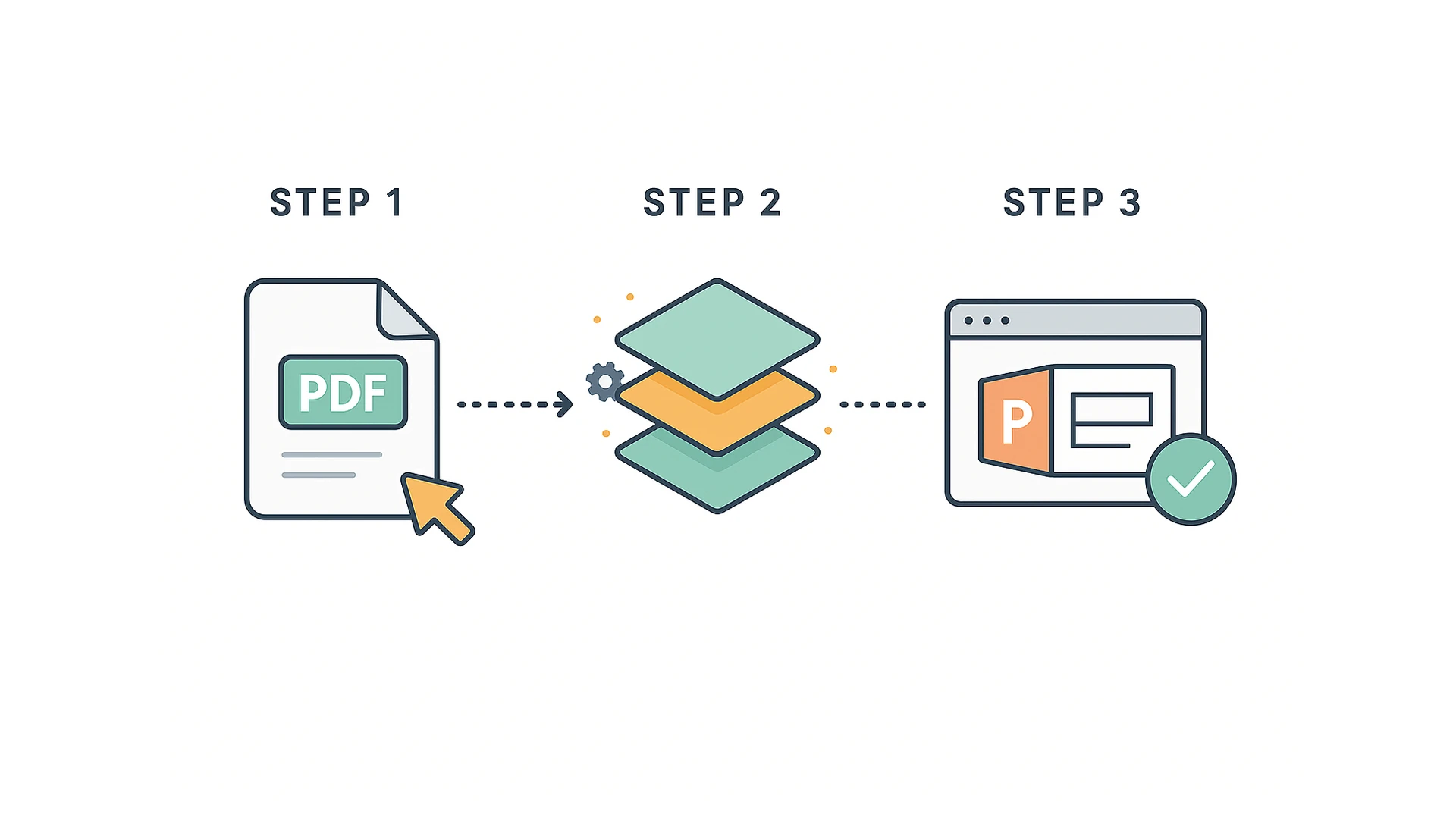
3 Simple Steps to Convert NotebookLM Slides into Editable PPT
No complex image editing software required. Everything happens directly inside your web browser:
Step 1: Export Your File from NotebookLM
In Google NotebookLM, open your slide brief or study guide and export it as a PDF file (or take high-resolution screenshots if you only need specific slides).
Step 2: Upload to NoteSlides for Intelligent Layer Splitting
Navigate to NoteSlides and drag-and-drop your PDF into the upload zone.
In approximately 30 seconds, NoteSlides automatically splits the deck:
- Text becomes native text boxes: Headlines, body paragraphs, and metric notes are isolated into standard text boxes. Double-click to type changes or update numbers;
- Cards become movable layers: Container boxes and summary callouts can be repositioned, restyled, or deleted freely;
- Background fills in automatically: When you move or delete a card, underlying textures and gradients are restored without leaving blank white holes.
If you don't have PowerPoint installed on your computer, you can make quick text and layout edits directly in NoteSlides' in-browser web canvas.
Step 3: Download Native .pptx and Apply Your Slide Master
Once you are satisfied with the preview, click download to export a standard 16:9 .pptx presentation.
Open the file in PowerPoint, WPS Office, Google Slides, or Keynote. Paste the slides into your company template or adjust fonts with complete freedom.
An Honest Look at Boundaries: What Still Requires a Quick Manual Touch?
To maintain transparent engineering expectations, here are the real-world boundaries of what automated slide conversion handles:
- Complex native charts (e.g., Excel-linked dynamic bar charts):
Visual diagrams generated by NotebookLM are rendered visual assets. NoteSlides extracts them as high-resolution, independent movable graphics that you can resize or reposition cleanly. However, it does not automatically recreate live Excel spreadsheets behind the charts. To change a chart metric, you can easily overlay a native text box over the data point. - Specialized font mapping:
To ensure your slides open seamlessly on colleagues' laptops without "missing font" errors, NoteSlides intelligently maps decorative fonts to universal cross-platform typefaces (Arial, Calibri, Helvetica, PingFang). If you use a custom corporate brand font, you can apply it globally in PowerPoint with one click. - In-browser preview before download:
You don't need to guess how your deck will turn out. Use the built-in web canvas to inspect layers, adjust wording, and preview alignments online before exporting your.pptx.
Frequently Asked Questions (FAQ)
Q1: Will this scramble my sentences into broken single-word fragments?
No. Traditional OCR converters often slice continuous sentences into dozens of awkward one-word text boxes. NoteSlides recognizes layout hierarchy to keep complete sentences in unified paragraph boxes that wrap text naturally.
Q2: Does moving a card leave an ugly white hole behind?
No. When content containers or cards are lifted off the slide, the covered background colors and textures are automatically infilled, leaving a clean slide master underneath.
Q3: Are the exported files compatible with all presentation tools?
Yes. NoteSlides exports standard Office OpenXML (.pptx) files fully compatible with Microsoft PowerPoint (desktop & web), WPS Office, Google Slides, and Apple Keynote.
Try It for Free
Stop wasting hours retyping text from static screenshots or rebuilding card layouts from scratch.
New accounts receive free signup credits. Upload a NotebookLM PDF or slide image to experience how easy it is to get an editable PowerPoint deck today!